Close Menu
  • Home
  • Features
  • Microsoft 365
    • Word
    • Excel
    • Power point
    • Teams
    • Sharepoint
    • One Drive
    • outlook
    • Copilot
  • M365pros_security
    • Defender for M365
    • Defender for Endpoint
  • Intune Zone
  • Windows Server
What's Hot

Deploy the LOLBINS (Living Off The Land Binary Attacks) prevention-focused ASR rules via custom configuration profile (OMA-URI) in Intune

March 27, 2026

Elevating CEH: Transforming a Single Curriculum into Beginner, Intermediate, Advanced, and Expert-Level Cybersecurity Training

March 27, 2026

The Intune Device Lifecycle: From Onboarding to Retirement (Best Practices)

July 3, 2025
Facebook Instagram
  • Download Free Chicklist
Facebook LinkedIn YouTube
Blog.m365pros.comBlog.m365pros.com
  • Home
  • Features
  • Microsoft 365
    • Word
    • Excel
    • Power point
    • Teams
    • Sharepoint
    • One Drive
    • outlook
    • Copilot
  • M365pros_security
    • Defender for M365
    • Defender for Endpoint
  • Intune Zone
  • Windows Server
Blog.m365pros.comBlog.m365pros.com
Home»administrative assistant»Integrating Microsoft Defender for Endpoint with Intune: Threat Protection That Responds
administrative assistant

Integrating Microsoft Defender for Endpoint with Intune: Threat Protection That Responds

Jeevan MahatBy Jeevan MahatJuly 3, 2025Updated:July 3, 2025No Comments3 Mins Read
Share Facebook LinkedIn Email Copy Link
Integrating Microsoft Defender for Endpoint with Intune: Threat Protection That Responds
Share
Facebook LinkedIn Email Copy Link

Deploying security tools is one thing, but connecting them to actually respond to threats? That’s where real protection happens.

With Microsoft Intune and Defender for Endpoint working together, you can:

  • Detect risky device behavior
  • Automatically update device compliance status
  • Trigger Conditional Access based on real-time threat data

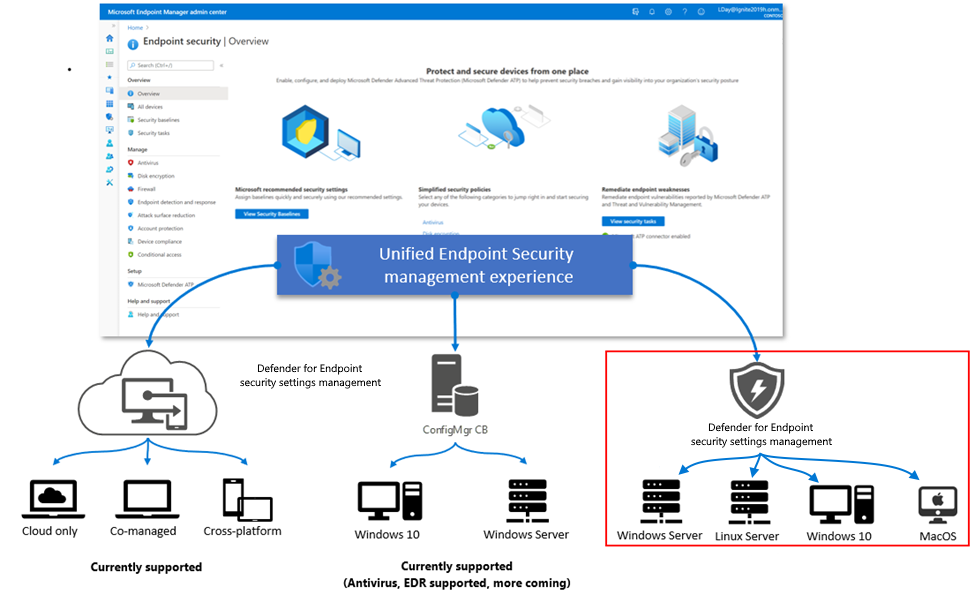
In this post, we’ll cover how to connect Defender for Endpoint (MDE) to Intune, what policies to configure, and how to turn detection into action.

Integrating MDE with Intune enables a feedback loop between endpoint protection and compliance enforcement.

  • Defender detects risky activity (malware, exploits, tampering)
  • Intune marks the device as non-compliant
  • Conditional Access blocks access to corporate apps
  • Admins are alerted and can investigate centrally

This creates a Zero Trust workflow that works in near real-time.

Prerequisites

  • Microsoft Defender for Endpoint Plan 1 or Plan 2
  • Devices enrolled in Intune (Windows 10/11 or macOS)
  • Defender for Endpoint onboarding is configured
  • Devices joined to Entra ID (formerly Azure AD)

How to Connect Defender for Endpoint to Intune

Step 1: Enable the connector

  • Go to Microsoft Intune Admin Center > Endpoint security > Microsoft Defender for Endpoint
  • Set Connect Windows 10.0.15063+ devices to Microsoft Defender Advanced Threat Protection to On.
  • Go to Defender Portal > Settings > Endpoints > Advanced Features
  • Scroll and make sure the Microsoft Intune connection is enabled
Article content
Article content

Step 2: Confirm integration in Intune

  • Go back to Endpoint security > Microsoft Defender for Endpoint
  • Make sure Connection status: Enabled
Article content

Create a Compliance Policy Based on Threat Level

You can now use MDE signals in compliance policies.

Steps:

  1. Go to Intune Admin Center > Devices > Compliance policies
  2. Create a policy for Windows 10 and later
  3. Under Microsoft Defender for Endpoint, set:
  4. Assign to device/user groups

Now, if Defender flags a device as “High” threat, Intune will mark it non-compliant.

Article content

Combine with Conditional Access for Real-Time Protection

Once the compliance policy is in place, you can enforce Conditional Access.

Steps:

  1. Go to Entra Admin Center > Protection > Conditional Access
  2. Create a policy that:

This ensures only healthy, low-risk devices can access corporate resources.

Article content

Monitor and Respond in Microsoft 365 Defender

All Defender detections flow into the Microsoft 365 Defender portal. From there, you can:

  • View device risk history
  • Run antivirus scans
  • Isolate infected endpoints
  • Initiate investigations

You now have one platform to detect, respond, and enforce policy, all linked to Intune.

Defender for Endpoint + Intune is a powerful combo for any Zero Trust strategy.

It’s not just antivirus, it’s a real-time security engine that feeds directly into device compliance and Conditional Access decisions.

If you haven’t turned this on yet, it’s one of the highest-impact changes you can make to your M365 security posture.

Previous ArticleMicrosoft Defender Antivirus Policies with Intune
Next Article Managing Local Admin Access in Intune: Account Protection and LAPS
Jeevan Mahat
  • Website

Related Posts

administrative assistant

Deploy the LOLBINS (Living Off The Land Binary Attacks) prevention-focused ASR rules via custom configuration profile (OMA-URI) in Intune

March 27, 2026
Defender for Endpoint

Elevating CEH: Transforming a Single Curriculum into Beginner, Intermediate, Advanced, and Expert-Level Cybersecurity Training

March 27, 2026
administrative assistant

The Intune Device Lifecycle: From Onboarding to Retirement (Best Practices)

July 3, 2025
Add A Comment

Leave A Reply Cancel Reply

Recent Posts

  • Deploy the LOLBINS (Living Off The Land Binary Attacks) prevention-focused ASR rules via custom configuration profile (OMA-URI) in Intune
  • Elevating CEH: Transforming a Single Curriculum into Beginner, Intermediate, Advanced, and Expert-Level Cybersecurity Training
  • The Intune Device Lifecycle: From Onboarding to Retirement (Best Practices)
  • Proactive Monitoring in Intune: What You Can (and Should) Be Using Right Now
  • How to Use Proactive Remediations in Intune

Recent Comments

  1. Blog.m365pros.com on Ways to Share Files with People at Work Using Microsoft 365
  2. Blog.m365pros.com on How to Use M365 Copilot to Summarize a Word Document
  3. Blog.m365pros.com on How to Buy New Licenses in Microsoft 365 for Business
  4. Blog.m365pros.com on Adding Multiple Users in Microsoft 365
  5. Blog.m365pros.com on Ways to Share Files with People at Work Using Microsoft 365
zencere.com
zencere.com
Top Posts

M365 ERROR CODE 80192EE7 Solution 

April 30, 2024152 Views

How to Get help or support as an end user while using Microsoft 365 App

May 1, 202483 Views

Transform Your PowerPoint Bar Charts into Professional Masterpieces 2024

May 15, 202445 Views
Latest Reviews
hotwiretellecom.com
hotwiretellecom.com

Archives

  • March 2026
  • July 2025
  • June 2025
  • December 2024
  • November 2024
  • October 2024
  • September 2024
  • July 2024
  • June 2024
  • May 2024
  • April 2024
Most Popular

M365 ERROR CODE 80192EE7 Solution 

April 30, 2024152 Views

How to Get help or support as an end user while using Microsoft 365 App

May 1, 202483 Views

Transform Your PowerPoint Bar Charts into Professional Masterpieces 2024

May 15, 202445 Views
People's Favorite

Deploy the LOLBINS (Living Off The Land Binary Attacks) prevention-focused ASR rules via custom configuration profile (OMA-URI) in Intune

March 27, 2026

Elevating CEH: Transforming a Single Curriculum into Beginner, Intermediate, Advanced, and Expert-Level Cybersecurity Training

March 27, 2026

The Intune Device Lifecycle: From Onboarding to Retirement (Best Practices)

July 3, 2025
© 2026 blog.m365pros.com. Designed by blog.m365pros.com
  • Home
  • Microsoft 365
  • Teams
  • One Drive
  • Windows Server
  • outlook

Type above and press Enter to search. Press Esc to cancel.