Close Menu
  • Home
  • Features
  • Microsoft 365
    • Word
    • Excel
    • Power point
    • Teams
    • Sharepoint
    • One Drive
    • outlook
    • Copilot
  • M365pros_security
    • Defender for M365
    • Defender for Endpoint
  • Intune Zone
  • Windows Server
What's Hot

How to Create Users in Microsoft 365

April 4, 2026

Deploy the LOLBINS (Living Off The Land Binary Attacks) prevention-focused ASR rules via custom configuration profile (OMA-URI) in Intune

March 27, 2026

Elevating CEH: Transforming a Single Curriculum into Beginner, Intermediate, Advanced, and Expert-Level Cybersecurity Training

March 27, 2026
Facebook Instagram
  • Download Free Chicklist
Facebook LinkedIn YouTube
Blog.m365pros.comBlog.m365pros.com
  • Home
  • Features
  • Microsoft 365
    • Word
    • Excel
    • Power point
    • Teams
    • Sharepoint
    • One Drive
    • outlook
    • Copilot
  • M365pros_security
    • Defender for M365
    • Defender for Endpoint
  • Intune Zone
  • Windows Server
Blog.m365pros.comBlog.m365pros.com
Home»Defender for Endpoint»Managing Mailbox Delegation in Exchange Admin Center
Defender for Endpoint

Managing Mailbox Delegation in Exchange Admin Center

Jeevan MahatBy Jeevan MahatJune 3, 2025Updated:July 22, 2025No Comments1 Min Read
Share Facebook LinkedIn Email Copy Link
Configure-mailbox-delegation-in-Exchange-Online-admin-center
Share
Facebook LinkedIn Email Copy Link
video

How to Manage Shared Mailbox Access in the Exchange Admin Center and open shared mailbox in Web.

1. Introduction
Overview of accessing and managing shared mailboxes in Exchange Admin Center.

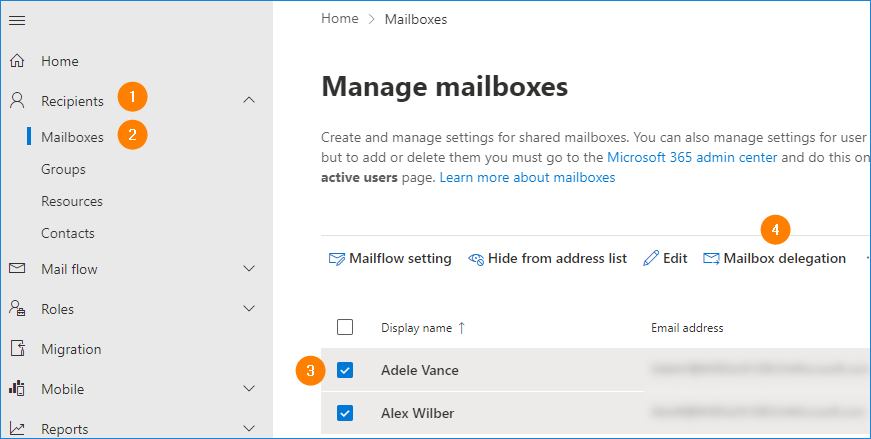
2. Accessing the Shared Mailbox
Log into Exchange Admin Center.
Navigate to the shared mailbox (or user mailbox) you want to manage.

3. Configuring Delegation Settings
Click on the mailbox to open its settings.
Locate the “Delegation” option.
Understand the access types:
Send As: Allows users to send emails as the shared mailbox.
Read and Manage Full Access: Allows users to read and manage emails in the shared mailbox.
Assign the appropriate access based on user requests:
Most commonly, assign “Read and Manage Full Access.”
Optionally, assign “Send As” access if needed.

4. Confirming Access
Check the list of users who currently have access to the shared mailbox.
Example: Users “help@contoso.com” and “admin@…” have access.

5. Accessing the Shared Mailbox from the Web
Open your main mailbox.
Click on the “Open other mailbox” option.
Type in the email address of the shared mailbox (e.g., “admin@…”).
Access the shared mailbox in a new tab.

https://lnkd.in/gTTvUMQh

hashtag#M365Pros hashtag#Exchange hashtag#M365

m365professionals.com
culture gadgets latestpost phones technology
Previous ArticleWhy Endpoint Security Deserves a Seat in the Boardroom
Next Article The Intune Device Lifecycle: From Onboarding to Retirement (Best Practices)
Jeevan Mahat
  • Website

Related Posts

administrative assistant

How to Create Users in Microsoft 365

April 4, 2026
administrative assistant

Deploy the LOLBINS (Living Off The Land Binary Attacks) prevention-focused ASR rules via custom configuration profile (OMA-URI) in Intune

March 27, 2026
Defender for Endpoint

Elevating CEH: Transforming a Single Curriculum into Beginner, Intermediate, Advanced, and Expert-Level Cybersecurity Training

March 27, 2026
Add A Comment

Leave A Reply Cancel Reply

Recent Posts

  • How to Create Users in Microsoft 365
  • Deploy the LOLBINS (Living Off The Land Binary Attacks) prevention-focused ASR rules via custom configuration profile (OMA-URI) in Intune
  • Elevating CEH: Transforming a Single Curriculum into Beginner, Intermediate, Advanced, and Expert-Level Cybersecurity Training
  • The Intune Device Lifecycle: From Onboarding to Retirement (Best Practices)
  • Proactive Monitoring in Intune: What You Can (and Should) Be Using Right Now

Recent Comments

  1. Blog.m365pros.com on Perfect Your Prompt with Microsoft 365 Copilot: Unleash Your Productivity
  2. Blog.m365pros.com on Perfect Your Prompt with Microsoft 365 Copilot: Unleash Your Productivity
  3. สล็อตเว็บตรง on Perfect Your Prompt with Microsoft 365 Copilot: Unleash Your Productivity
  4. สล็อต on Perfect Your Prompt with Microsoft 365 Copilot: Unleash Your Productivity
  5. stashpatrick cc on The Intune Device Lifecycle: From Onboarding to Retirement (Best Practices)
zencere.com
zencere.com
Top Posts

M365 ERROR CODE 80192EE7 Solution 

April 30, 2024152 Views

How to Get help or support as an end user while using Microsoft 365 App

May 1, 202483 Views

Managing Windows Updates with Intune: Best Practices with Update Rings

June 3, 202548 Views
Latest Reviews
hotwiretellecom.com
hotwiretellecom.com

Archives

  • April 2026
  • March 2026
  • July 2025
  • June 2025
  • December 2024
  • November 2024
  • October 2024
  • September 2024
  • July 2024
  • June 2024
  • May 2024
  • April 2024
Most Popular

M365 ERROR CODE 80192EE7 Solution 

April 30, 2024152 Views

How to Get help or support as an end user while using Microsoft 365 App

May 1, 202483 Views

Managing Windows Updates with Intune: Best Practices with Update Rings

June 3, 202548 Views
People's Favorite

How to Create Users in Microsoft 365

April 4, 2026

Deploy the LOLBINS (Living Off The Land Binary Attacks) prevention-focused ASR rules via custom configuration profile (OMA-URI) in Intune

March 27, 2026

Elevating CEH: Transforming a Single Curriculum into Beginner, Intermediate, Advanced, and Expert-Level Cybersecurity Training

March 27, 2026
© 2026 blog.m365pros.com. Designed by blog.m365pros.com
  • Home
  • Microsoft 365
  • Teams
  • One Drive
  • Windows Server
  • outlook

Type above and press Enter to search. Press Esc to cancel.