Close Menu
  • Home
  • Features
  • Microsoft 365
    • Word
    • Excel
    • Power point
    • Teams
    • Sharepoint
    • One Drive
    • outlook
    • Copilot
  • M365pros_security
    • Defender for M365
    • Defender for Endpoint
  • Intune Zone
  • Windows Server
What's Hot

Deploy the LOLBINS (Living Off The Land Binary Attacks) prevention-focused ASR rules via custom configuration profile (OMA-URI) in Intune

March 27, 2026

Elevating CEH: Transforming a Single Curriculum into Beginner, Intermediate, Advanced, and Expert-Level Cybersecurity Training

March 27, 2026

The Intune Device Lifecycle: From Onboarding to Retirement (Best Practices)

July 3, 2025
Facebook Instagram
  • Download Free Chicklist
Facebook LinkedIn YouTube
Blog.m365pros.comBlog.m365pros.com
  • Home
  • Features
  • Microsoft 365
    • Word
    • Excel
    • Power point
    • Teams
    • Sharepoint
    • One Drive
    • outlook
    • Copilot
  • M365pros_security
    • Defender for M365
    • Defender for Endpoint
  • Intune Zone
  • Windows Server
Blog.m365pros.comBlog.m365pros.com
Home»Featured»Understanding and resolving the 0x80004005 Error Code
Featured

Understanding and resolving the 0x80004005 Error Code

Rhythem PradhanBy Rhythem PradhanJuly 20, 2024Updated:September 29, 2024No Comments3 Mins Read
Share Facebook LinkedIn Email Copy Link
Understanding and resolving the 0x80004005 Error Code
Share
Facebook LinkedIn Email Copy Link

Understanding and resolving the 0x80004005 Error Code

The error code “0x80004005” is a common yet frustrating issue for many Windows users. This error, often described as an “Unspecified Error,” can occur in various situations, from failed updates to issues with file extraction. Understanding the root causes and solutions can help mitigate downtime and maintain system efficiency.

Common Scenarios for the 0x80004005 Error

Windows Updates:

This error can occur during the Windows update process, typically indicating that the update files are damaged or incomplete. It may also happen if there’s an issue with the Windows Update service.

File Extraction:

Users may encounter this error when extracting files from compressed formats like ZIP or RAR. This can be due to corrupted archive files or problems with the file extraction software.

Network Issues:

The error may appear when accessing shared folders or network drives. This usually points to network configuration problems or permissions issues.

Software Installation:

It can also arise during the installation or uninstallation of software, indicating corrupted installation files or conflicts with existing software.

How to Resolve the 0x80004005 Error

Run the Windows Update Troubleshooter:

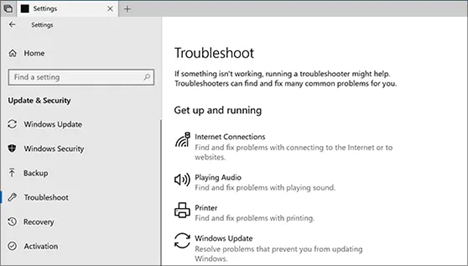
Windows has a built-in troubleshooter designed to detect and fix issues related to Windows updates. To use this:

  • Go to Settings > Update & Security > Troubleshoot.
  • Select Windows Update and run the troubleshooter.
  • Follow the on-screen instructions to resolve any detected issues.
Picture1

Check and Repair Corrupt System Files:

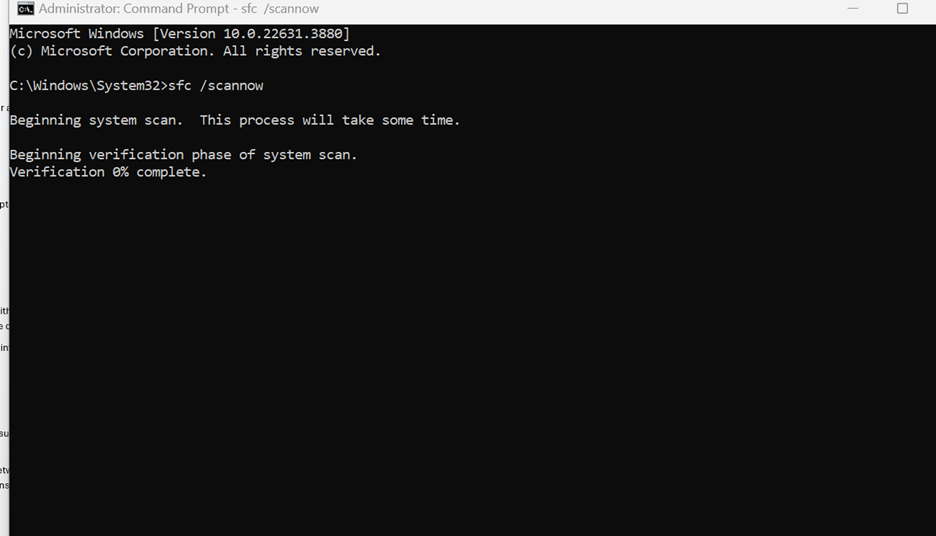
Using the System File Checker (SFC) tool, you can scan for and repair corrupted system files that may be causing the error.

  • Open Command Prompt as an administrator.
  • Type the following command and press Enter:

sfc /scannow

  • Wait for the scan to complete and follow any prompts to fix issues.
Picture2

Disable Antivirus or Firewall Temporarily:

Sometimes, antivirus software or firewalls can interfere with updates or file extraction. Temporarily disabling them can help identify if they are the cause.

Remember to re-enable them after troubleshooting to maintain system security.

Ensure Proper Network Configuration:

If the error occurs when accessing network resources, ensure that your network settings are correctly configured.

  • Check network permissions and ensure that the network path is accessible.
  • Verify that both the sharing and security permissions are set correctly on the network folder.

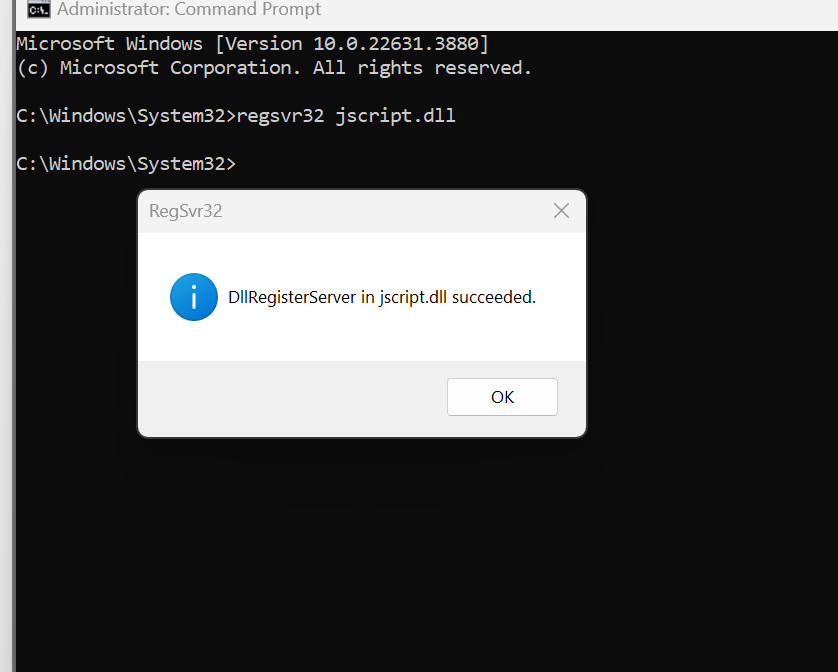
Re-register jdscript.dll and vbscript.dll:

These DLL files can sometimes cause issues with updates or software installations.

  • Open Command Prompt as an administrator.
  • Type the following commands one by one and press Enter after each:

regsvr32 jscript.dll
Picture3

regsvr32 vbscript.dll

Picture4

Perform a Clean Boot:

A clean boot can help identify if background programs are causing the error.

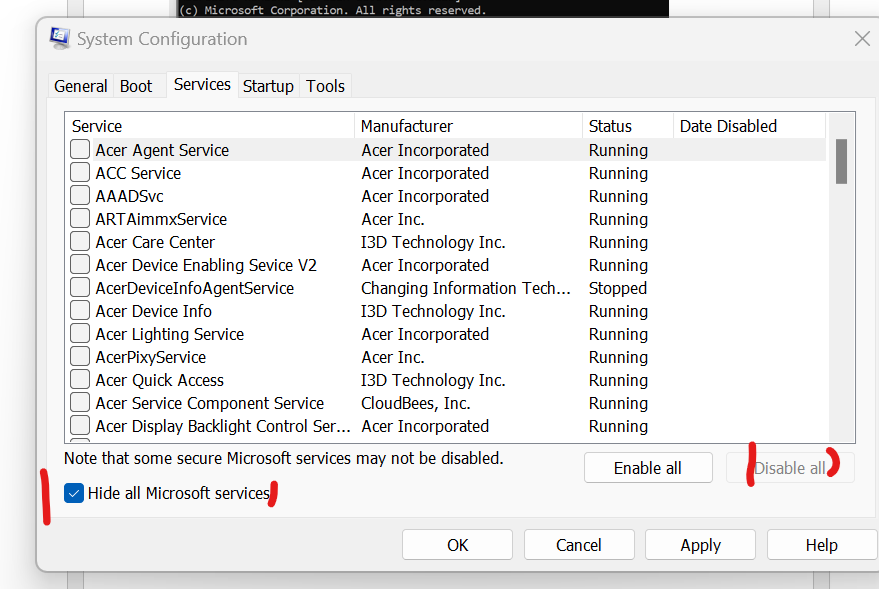
  • Open the System Configuration tool (msconfig).
Picture5
  • Under the Services tab, check Hide all Microsoft services and then click Disable all.
Picture6
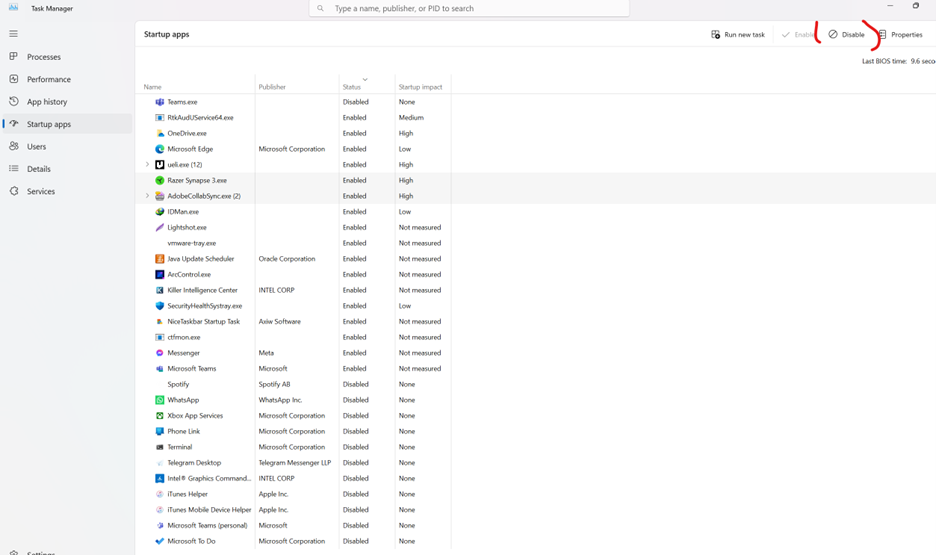
  • Go to the Startup tab and click Open Task Manager.

Select startup apps and click on Disable to disable all startup items.
Picture7
  • Restart your computer and see if the issue persists.

Check for Disk Errors:

Corrupted files can also stem from disk errors. Running a disk check can help.

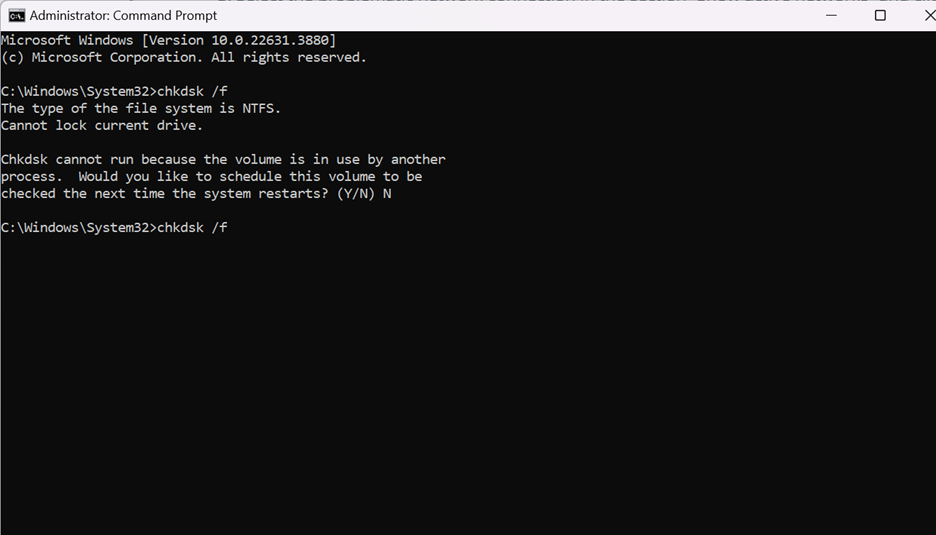
  • Open Command Prompt as an administrator.
  • Type the following command and press Enter:

chkdsk /f Follow the prompts to schedule a disk check on the next restart.
Picture8

Conclusion

The 0x80004005 error can be a hindrance, but with the right approach, it can be resolved. By systematically troubleshooting the potential causes—whether related to updates, file extraction, network issues, or software conflicts—you can restore your system to optimal performance. If the problem persists, consulting with IT professionals or reaching out to support services like m365pros can provide more specialized assistance.

M365 Professionals

blog.m365pros.com 


culture gadgets phones technology
Previous ArticleImplement Standard security with Group Policy Object in AD
Next Article Detailed Documentation: CrowdStrike Windows Outage Fix
Rhythem Pradhan
  • Website

Related Posts

administrative assistant

Deploy the LOLBINS (Living Off The Land Binary Attacks) prevention-focused ASR rules via custom configuration profile (OMA-URI) in Intune

March 27, 2026
administrative assistant

The Intune Device Lifecycle: From Onboarding to Retirement (Best Practices)

July 3, 2025
administrative assistant

Proactive Monitoring in Intune: What You Can (and Should) Be Using Right Now

July 3, 2025
Add A Comment

Leave A Reply Cancel Reply

Recent Posts

  • Deploy the LOLBINS (Living Off The Land Binary Attacks) prevention-focused ASR rules via custom configuration profile (OMA-URI) in Intune
  • Elevating CEH: Transforming a Single Curriculum into Beginner, Intermediate, Advanced, and Expert-Level Cybersecurity Training
  • The Intune Device Lifecycle: From Onboarding to Retirement (Best Practices)
  • Proactive Monitoring in Intune: What You Can (and Should) Be Using Right Now
  • How to Use Proactive Remediations in Intune

Recent Comments

  1. Blog.m365pros.com on Ways to Share Files with People at Work Using Microsoft 365
  2. Blog.m365pros.com on How to Use M365 Copilot to Summarize a Word Document
  3. Blog.m365pros.com on How to Buy New Licenses in Microsoft 365 for Business
  4. Blog.m365pros.com on Adding Multiple Users in Microsoft 365
  5. Blog.m365pros.com on Ways to Share Files with People at Work Using Microsoft 365
zencere.com
zencere.com
Top Posts

M365 ERROR CODE 80192EE7 Solution 

April 30, 2024152 Views

How to Get help or support as an end user while using Microsoft 365 App

May 1, 202483 Views

Transform Your PowerPoint Bar Charts into Professional Masterpieces 2024

May 15, 202445 Views
Latest Reviews
hotwiretellecom.com
hotwiretellecom.com

Archives

  • March 2026
  • July 2025
  • June 2025
  • December 2024
  • November 2024
  • October 2024
  • September 2024
  • July 2024
  • June 2024
  • May 2024
  • April 2024
Most Popular

M365 ERROR CODE 80192EE7 Solution 

April 30, 2024152 Views

How to Get help or support as an end user while using Microsoft 365 App

May 1, 202483 Views

Transform Your PowerPoint Bar Charts into Professional Masterpieces 2024

May 15, 202445 Views
People's Favorite

Deploy the LOLBINS (Living Off The Land Binary Attacks) prevention-focused ASR rules via custom configuration profile (OMA-URI) in Intune

March 27, 2026

Elevating CEH: Transforming a Single Curriculum into Beginner, Intermediate, Advanced, and Expert-Level Cybersecurity Training

March 27, 2026

The Intune Device Lifecycle: From Onboarding to Retirement (Best Practices)

July 3, 2025
© 2026 blog.m365pros.com. Designed by blog.m365pros.com
  • Home
  • Microsoft 365
  • Teams
  • One Drive
  • Windows Server
  • outlook

Type above and press Enter to search. Press Esc to cancel.